Timeline
1 - 2 months
Role
Senior UI/UX Designer
Platform
Responsive Web Application
Business model
B2B2C
Users
Students, job seekers, professionals, and career program users
Team
Me, 1 Design Manager, 1 PM
Scope
AI agent experience design, conversational workflows, cross-product interaction patterns, resume editor integration, Aspire integration
Products covered
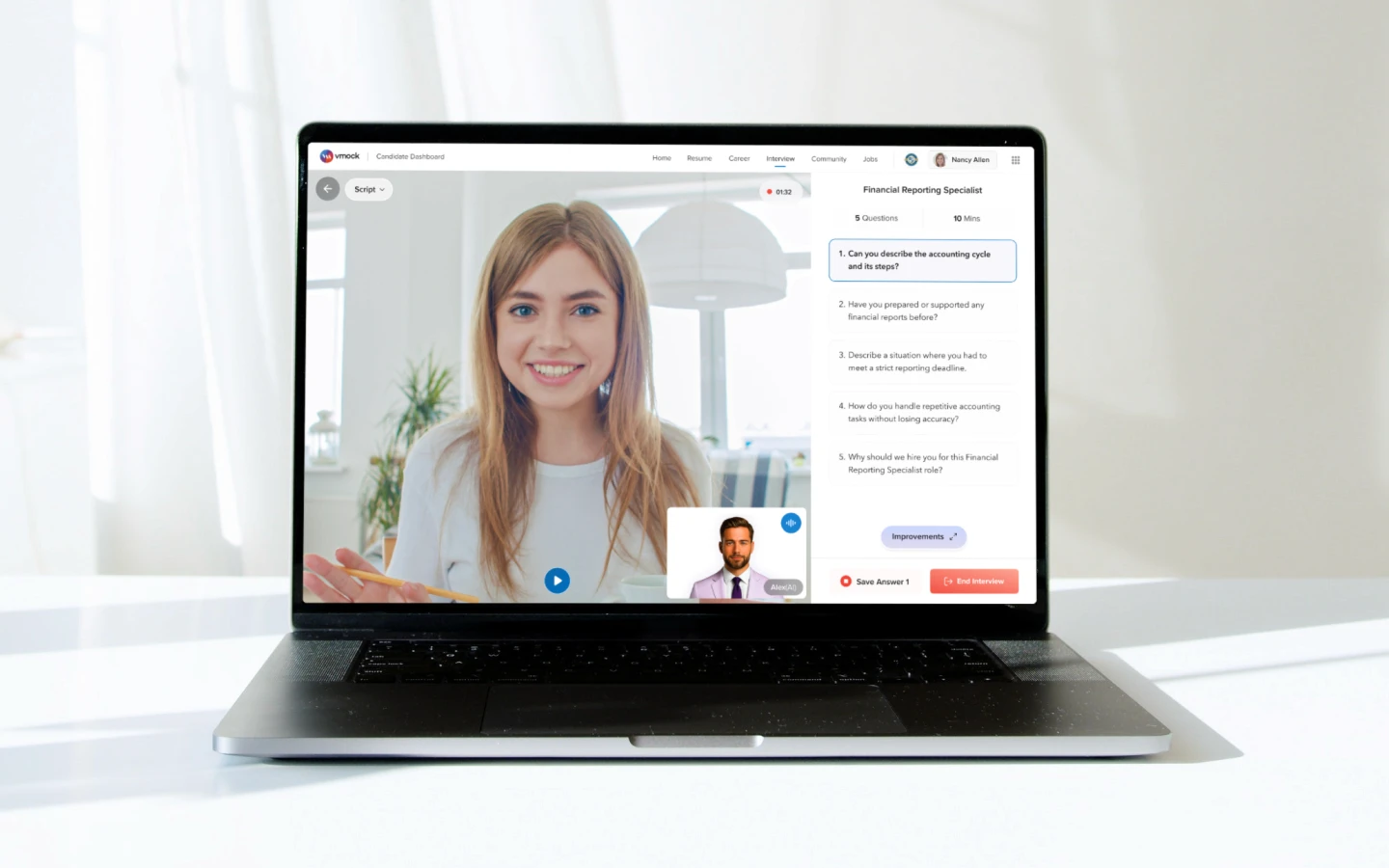
Resume, Cover Letter, Aspire, Interviews, Jobs, and other VMock career tools
Status
Ongoing
Overview
CareerBuddy added an AI coach across VMock products
VMock already had products like Resume, Cover Letter, Aspire, Interviews, Jobs, and other career tools.
My role was to integrate Vani into this ecosystem
Vani was designed as an AI career coach that could help users take action inside existing VMock workflows.
The existing products stayed intact
CareerBuddy did not replace Resume, Aspire, or Interviews. It added a guided AI layer on top, so users could ask for help in natural language and move into the right workflow faster.
Problem & Opportunity
Users had too many places to start
New users could see many useful tools, but they still had to decide which one to use first.
Important tasks still required manual effort
Users had to edit content, understand scores, follow suggestions, and decide the next step on their own.
The opportunity was to guide users from intent to action
Instead of making users understand the full product structure first, CareerBuddy could let them ask for help and move directly into the right VMock workflow.
Goal
The goal was to shift the experience from:
Users navigating multiple products manually
to
Users getting guided help from an AI career coach inside the VMock ecosystem
Design Direction
1. Adding an AI agent layer without replacing existing products
The existing VMock products remained intact. My work focused on integrating Vani as an additional intelligence layer that could guide users across Resume, Cover Letter, Aspire, Interviews, Jobs, and future workflows.
This allowed users to continue using familiar product interfaces while getting AI assistance whenever they needed help.
2. Letting users start with intent, not navigation
Instead of forcing users to find the right product first, Vani allowed them to begin by typing what they wanted to do.
A user could simply ask:
“Create a new resume”
“Improve my resume score”
“Tailor my resume to this job description”
“Add metrics to this internship”
“Optimize my LinkedIn profile”
Vani then helped route the user into the right workflow.
3. Designing for trust and control
Because Vani could suggest and apply changes to important career documents, the experience needed clear user control.
I designed flows where Vani first explains what it found, shows suggested improvements, and asks for confirmation before applying important updates.
This helped the AI feel helpful without feeling unpredictable.
Final Experience
CareerBuddy became the AI layer across VMock
The final experience introduced CareerBuddy as a guided layer on top of existing VMock products like Resume, Cover Letter, Aspire, Interviews, and Jobs.
Users could ask for help instead of finding the right tool first
Users could type what they wanted to do, create a resume, improve a bullet, optimize LinkedIn, tailor content to a job description, or understand a score and Vani guided them into the right workflow.
Existing products stayed the same, but became easier to use
CareerBuddy did not replace VMock’s products. It made them more accessible by adding AI support inside the existing workflows.
The experience felt more connected
Instead of moving between separate tools manually, users could start with one request and continue their career task with guided support.
Designing a reusable AI interaction system
Mapped user requests into clear AI actions
I first broke down common user prompts into a simple structure: what the user asks, what Vani should do, what output should be shown, and how the UX should respond.
Moved beyond plain chatbot replies
Vani needed to support real product tasks like editing resume content, fixing errors, importing LinkedIn data, explaining scores, attaching job descriptions, showing job matches, and confirming updates.
Created reusable components for different response types
I designed action cards, content widgets, score cards, file previews, quick actions, confirmation states, and status cards to make Vani’s responses easier to scan and act on.
Made the system scalable across VMock products
The same interaction system could be reused across Resume, Aspire, Jobs, Interviews, Cover Letter, and future workflows, helping Vani feel like one consistent AI career coach.
User input → AI action → output
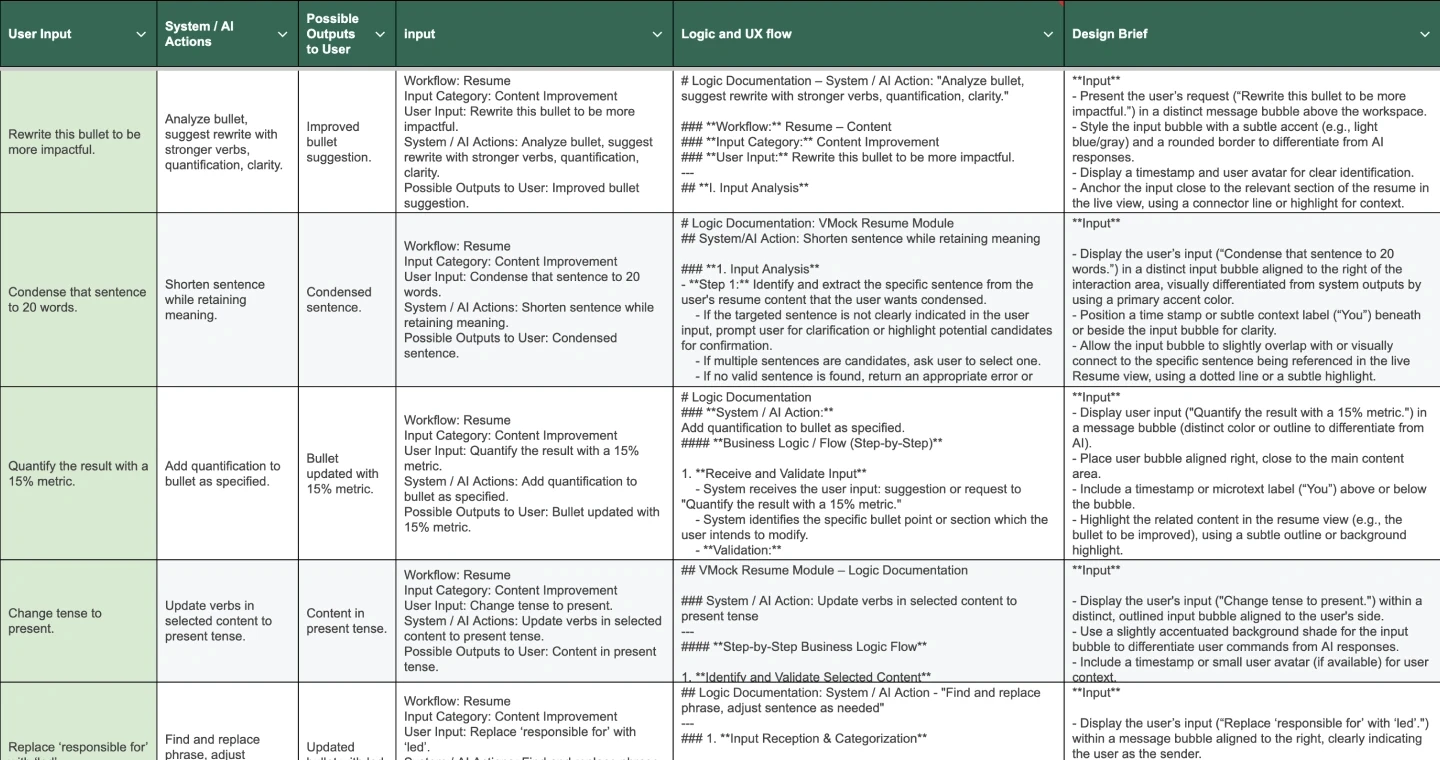

A walkthrough of how Vani was integrated across key VMock workflows.
The screens below focus mainly on Resume and Aspire as representative examples, while the same AI agent interaction model was designed to scale across the broader VMock product ecosystem.
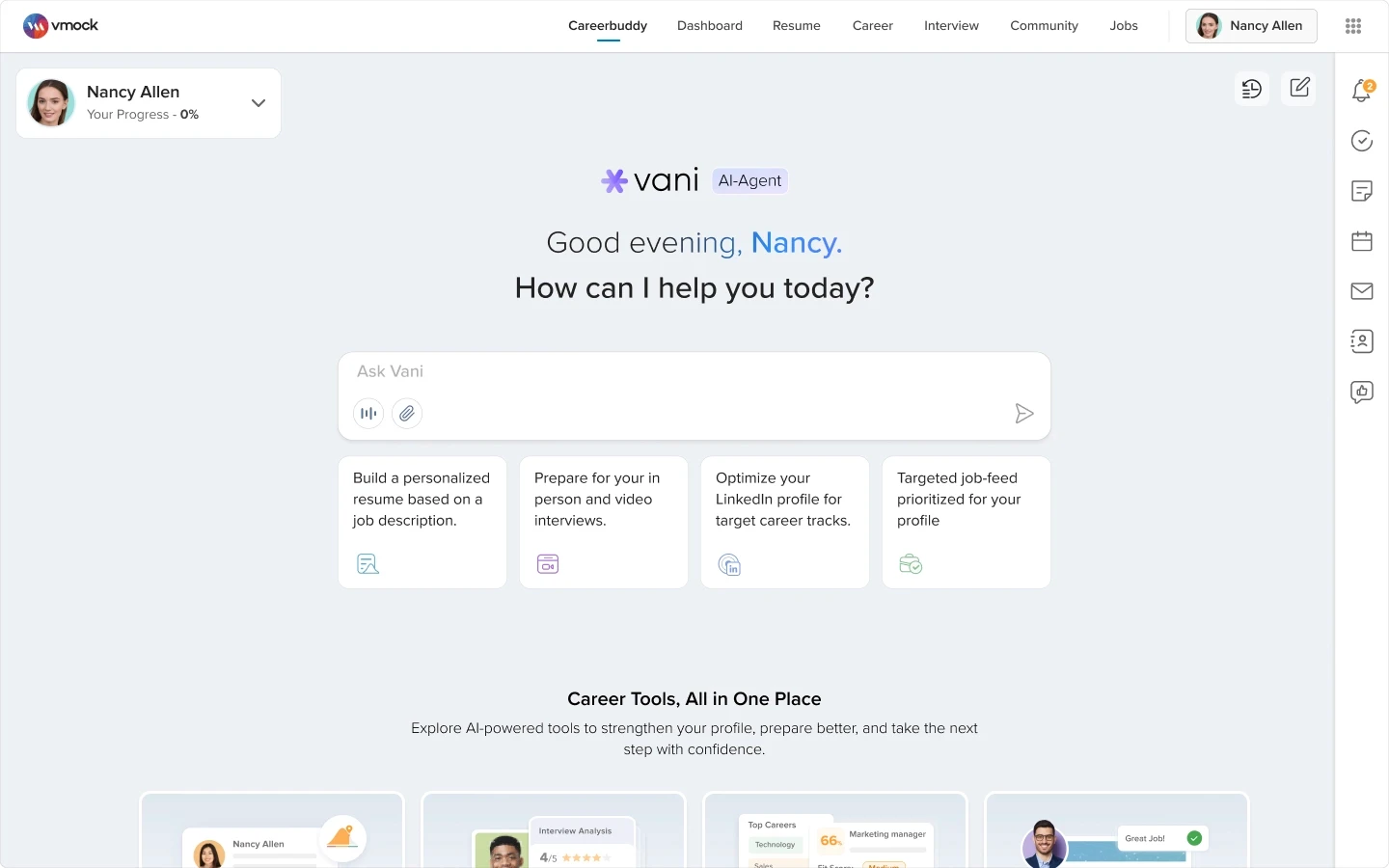
CareerBuddy - Zero State
Design Decisions
Created a new AI entry point across VMock
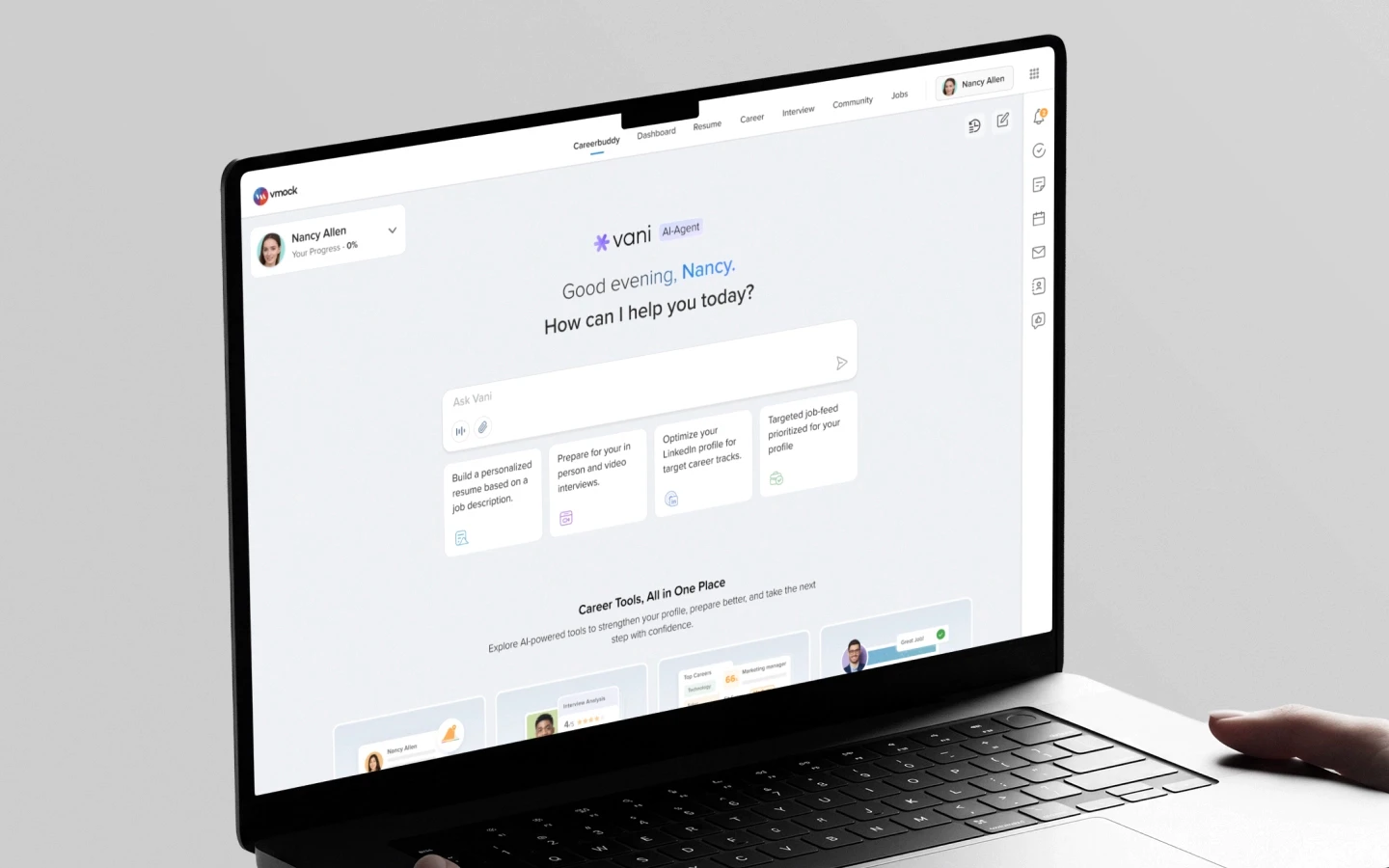
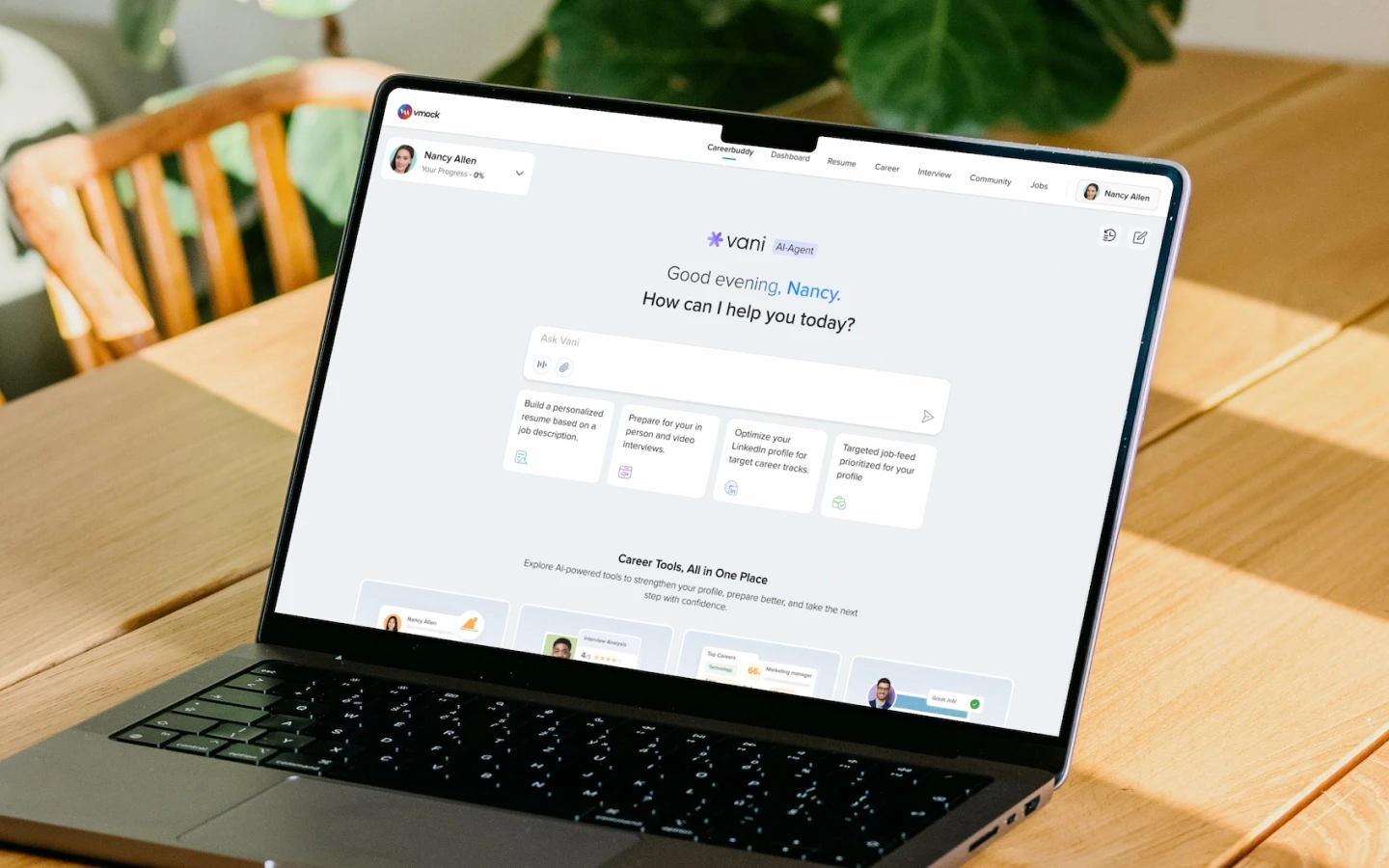
I introduced CareerBuddy as a new top-level navigation item so users could access AI-guided career support from one central place.
Instead of starting with multiple product choices, users could begin by asking Vani what they wanted to do.
Reduced friction for first-time users
The screen starts with a simple prompt: “How can I help you today?”
This helped users begin with their career goal instead of first understanding the full VMock product structure.
Introduced the broader VMock ecosystem without overwhelming users
Quick prompts helped users understand what they could ask, while product cards at the bottom introduced tools like Resume, Aspire, Interviews, Jobs, and Cover Letter.
This gave users both guidance and discovery in the same zero-state experience.
Expanded Progress View

Design Decisions
Made product progress visible in one place
The expanded progress view shows where users stand across VMock products like Resume, Aspire, Interviews, and Jobs.
This helped users quickly understand what is completed, ongoing, or yet to start without opening every product separately.
Kept AI guidance available beside progress
The center of the screen remains conversational, allowing users to chat with Vani while seeing their product progress on the side.
This helped combine progress visibility with career guidance in one workspace.
Resume Editor: Ask Vani Integration

Design Decisions
Added AI help inside the existing resume editor
I added an Ask Vani entry point inside the resume editor so users could get AI assistance without leaving the existing workflow.
The original resume editor and scoring experience remained intact, while Vani worked as an assistive layer on top.
Supported resume edits through natural language
Users could ask Vani to improve content, rewrite bullets, explain issues, or suggest section-level changes directly from the editor.
This made resume improvement feel faster and more conversational, without forcing users to manually find every editing option.
Auto-Fix Resume Issues
Design Decisions
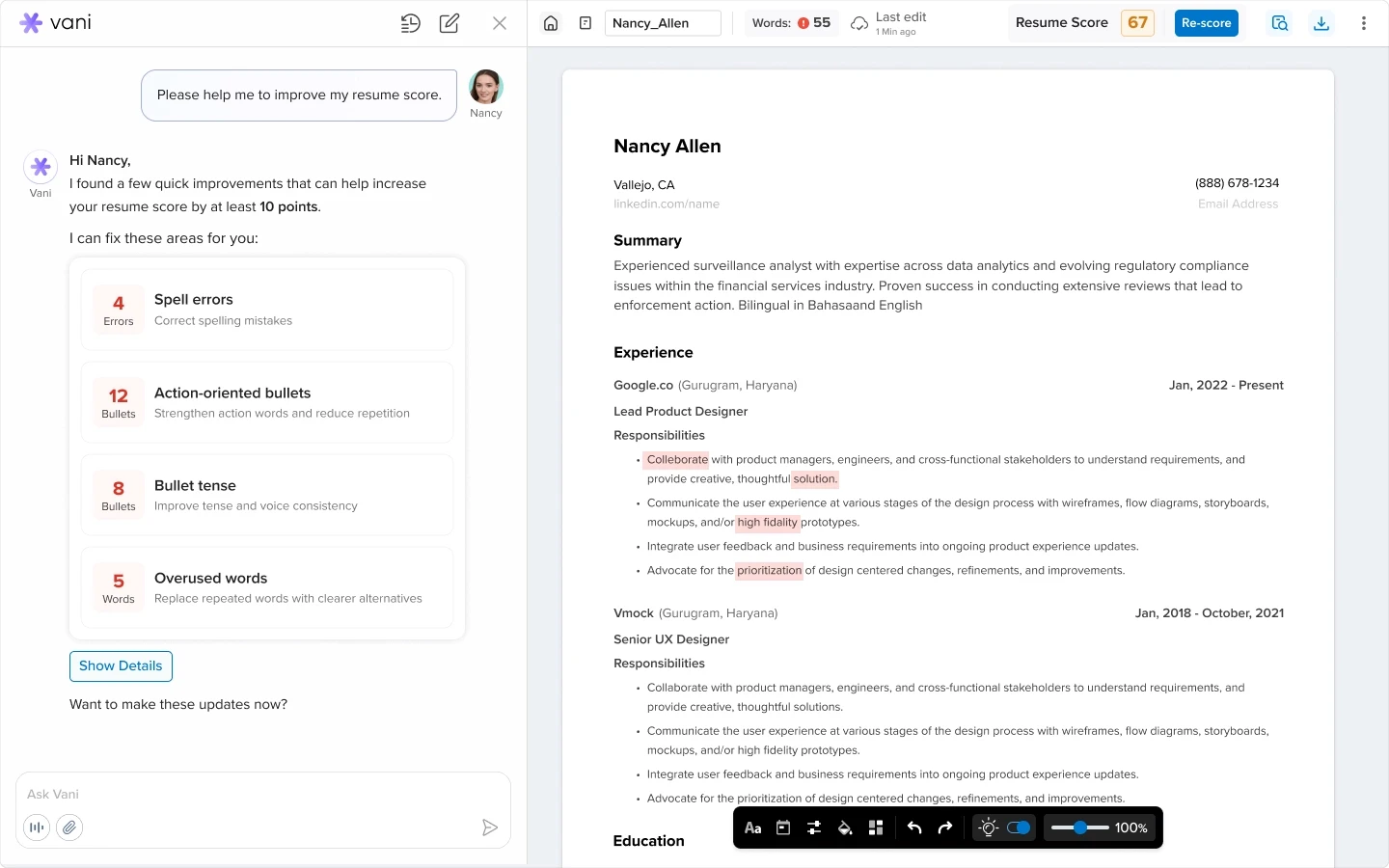
Showed improvement areas before applying AI changes
After a user uploads a resume, Vani identifies key improvement areas such as spelling errors, weak action words, tense issues, and overused words.
Instead of applying changes immediately, the system first shows what can be improved.
Kept users in control of AI edits
Users can review the suggested fixes and decide whether they want Vani to apply them.
This made the AI feel helpful and transparent, without taking control away from the user.
Made resume improvement feel visible
After approval, Vani applies the fixes and shows completed states for each improvement area.
This helped users clearly see what changed and how the resume score improved.
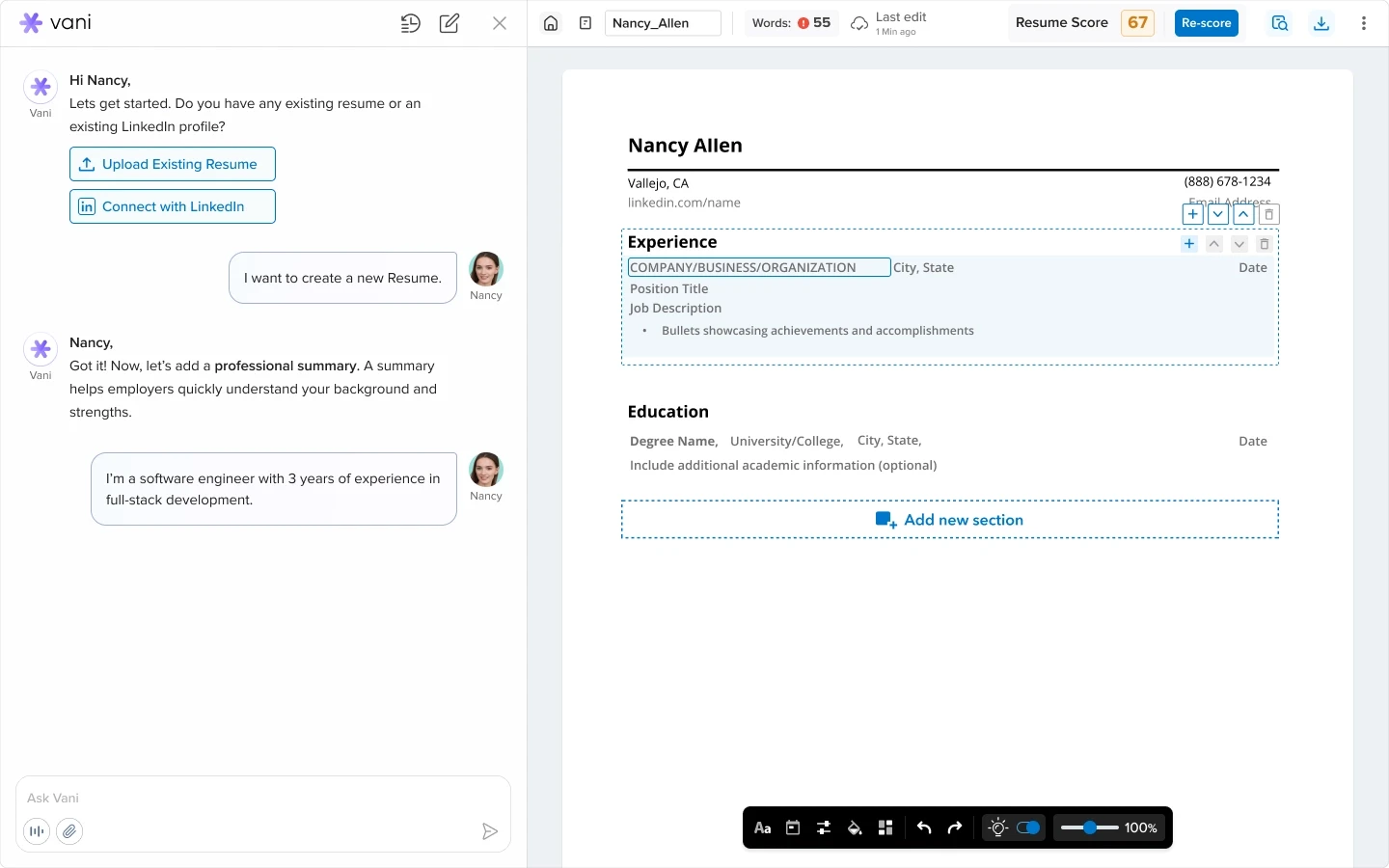
Create New Resume Through Vani
Design Decisions
Turned the blank resume state into a guided conversation
When users ask Vani to create a new resume, the experience shifts from a blank editor into a step-by-step conversation.
Vani asks for the right information, such as summary, experience, education, and skills, while the resume gets built alongside the conversation.
Reduced the effort of starting from scratch
Users no longer need to understand resume structure before beginning.
They can simply describe their goal, and Vani guides them through the required sections one by one.
Add Metrics to Resume Content

Design Decisions
Helped users make resume bullets more outcome-driven
Users can ask Vani to add metrics to an internship or work experience bullet.
Vani suggests quantified achievement statements that make the content more specific, measurable, and recruiter-friendly.
Gave users control before adding suggestions
Users can review, copy, regenerate, or modify the suggested bullets before applying them.
This helped AI writing support feel useful without replacing the user’s judgment.
Education - Add Degree

Design Decisions
Let users update resume sections through simple requests
Users can ask Vani to add another degree to the education section instead of manually finding and editing the right field.
Vani places the new information directly into the resume structure.
Asked for optional details to improve completeness
After adding the degree, Vani asks for details like GPA, coursework, honors, or academic achievements.
This helped users make the education section stronger without overwhelming them upfront.
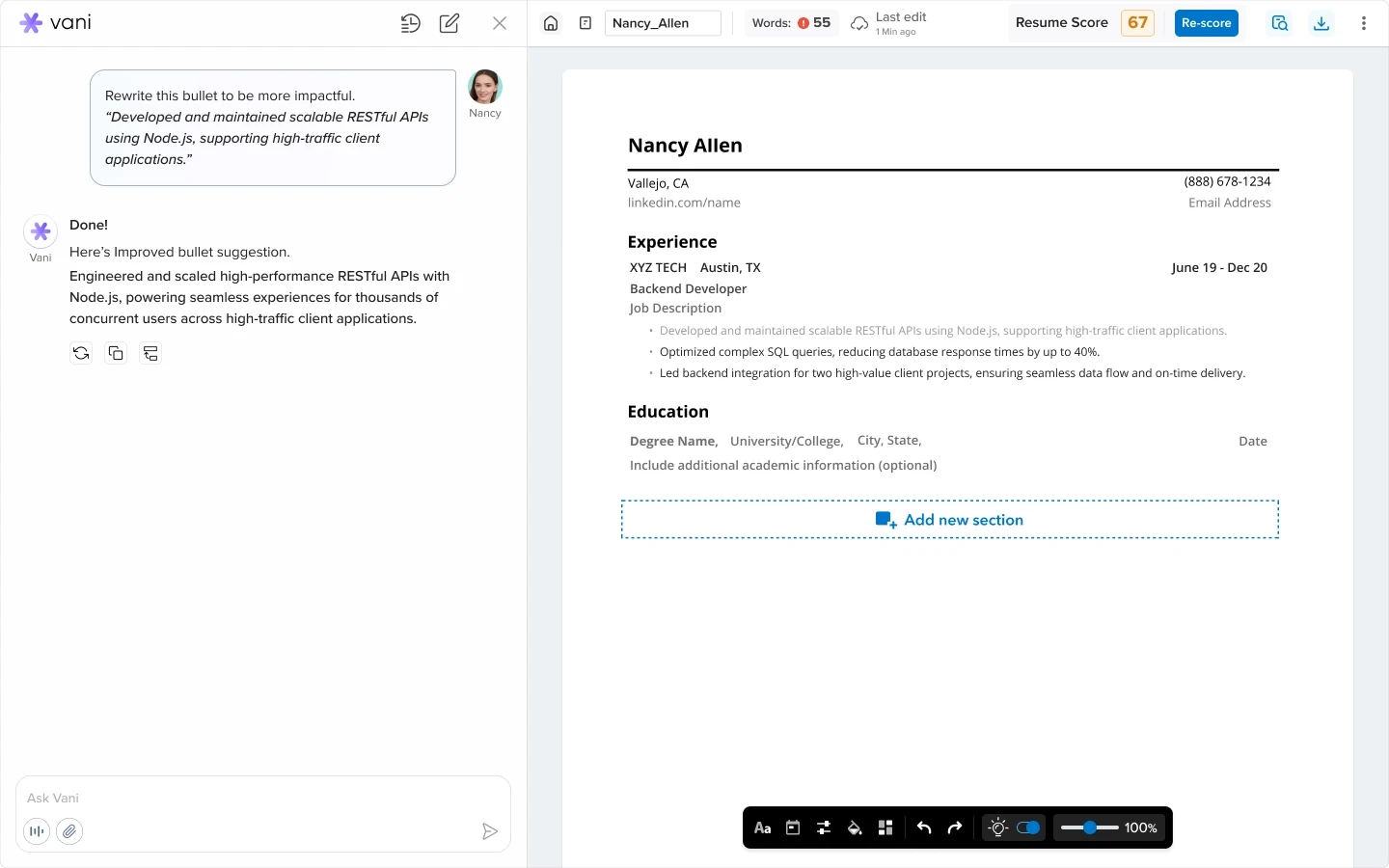
Rewrite Bullet
Design Decisions
Allowed users to improve selected content directly
Users can ask Vani to rewrite a specific resume bullet to make it more impactful.
Vani understands the selected content and suggests a stronger version with clearer action language and better structure.
Quick Actions on Resume Bullets
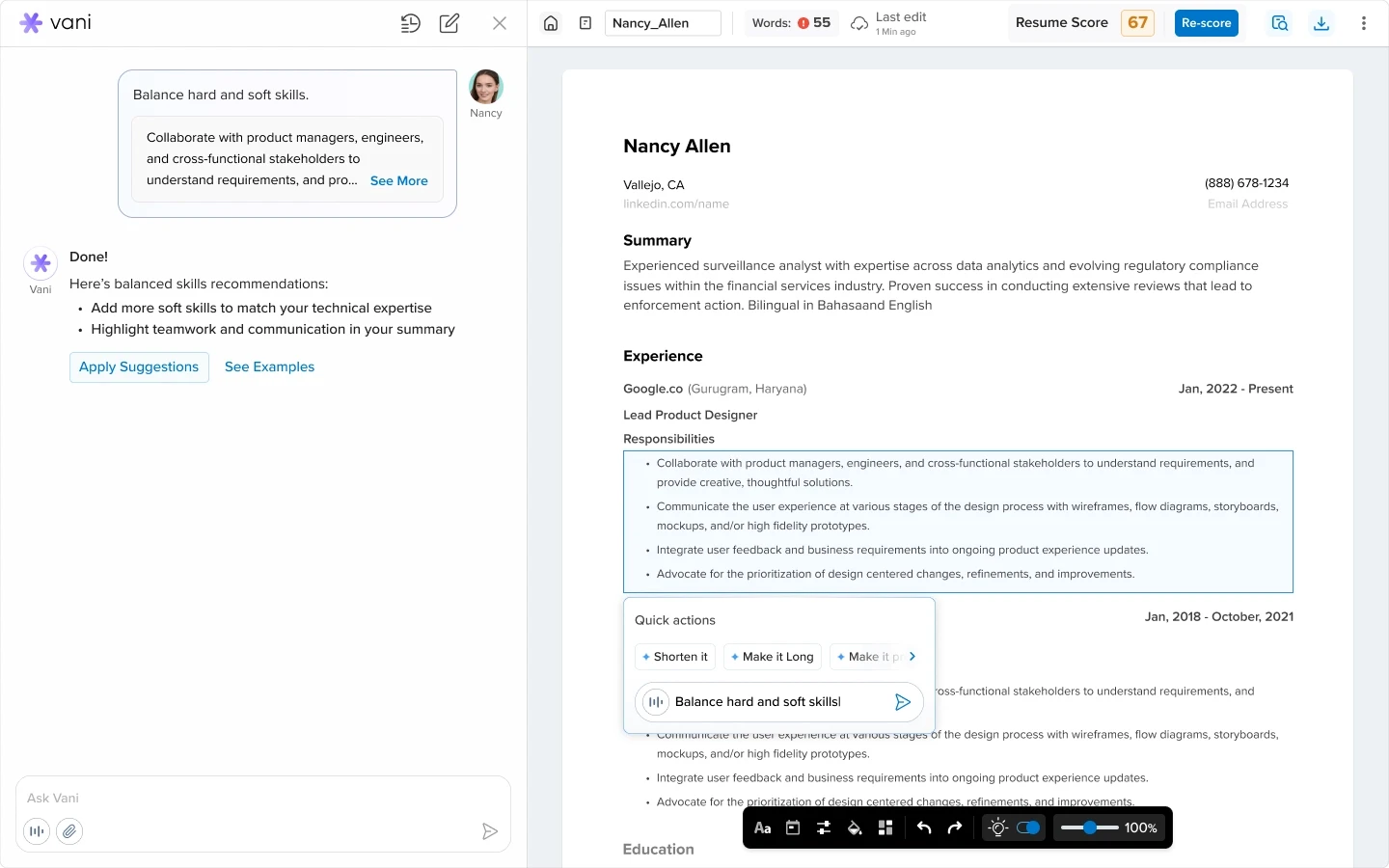
Added contextual actions near selected content
When users select a resume bullet, quick actions appear near the content they are editing.
This allowed users to shorten, expand, refine, or improve the bullet without writing a detailed prompt every time.
Pull Details from LinkedIn

Helped users create a resume from existing profile data
Users can ask Vani to pull information from their LinkedIn profile and create a resume draft automatically.
This helped users move faster from profile data to a workable resume instead of starting from a blank template.
Aspire: LinkedIn Optimization with Vani

Design Decisions
Extended Vani beyond Resume into Aspire
Vani was also integrated into Aspire, VMock’s LinkedIn profile optimization product.
This showed how the same AI agent model could support users across multiple VMock workflows, not just resume editing.
Previewed LinkedIn improvements before updating
After connecting LinkedIn, Vani shows suggested improvements for areas like headline, summary, skills, and keyword alignment.
Users can review the changes, view more edits, or update LinkedIn only when they are ready.
Kept AI actions transparent across products
Vani explains what will be improved before applying changes.
This helped maintain trust and control as the AI agent experience scaled from Resume to Aspire.
Scaling Vani Across More Use Cases
Design Decisions
Designed for many user requests, not one fixed flow
Resume and Aspire were representative examples, but Vani was designed to support many more requests across VMock products.
Users could ask Vani to add a company, add bullets, condense content, emphasize leadership impact, duplicate resumes, merge drafts, show version history, sync GitHub projects, explain scores, auto-apply to jobs, or tailor a resume to a job description.
Created reusable widgets and response patterns
To support these different requests, I designed reusable components such as action cards, confirmation states, content widgets, quick actions, score cards, file previews, and status components.
This made Vani’s responses structured, scannable, and easier to act on.
Built a scalable AI agent layer across the ecosystem
The goal was not to design a one-off chatbot for one product.
The interaction model was designed to scale across Resume, Aspire, Jobs, Interviews, Cover Letter, and future VMock workflows.
Outcome & Learnings
CareerBuddy helped transform VMock from a set of separate career tools into a more guided AI-powered experience.
By integrating Vani across existing workflows, users could ask for help in natural language, move into the right product flow, review AI suggestions, and apply changes with control.
The design created:
a new AI entry point across the VMock ecosystem,
conversational access to Resume, Aspire, Jobs, Interviews, Cover Letter, and other workflows,
reusable AI components for suggestions, confirmations, quick actions, scores, files, and status updates,
and a scalable foundation for extending Vani across future VMock products.
The biggest learning was that AI should not replace the product experience. It should make the existing experience easier to understand, easier to use, and easier to act on.